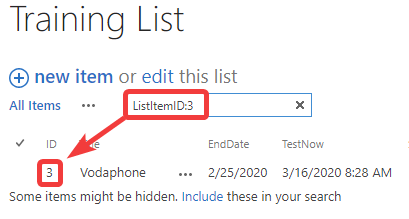
Solution: Searching by ID column in SharePoint list not working

1–2 minutes

I had an issue come up today where a user wanted to search a SharePoint list by the default ID column.

Problem:
The ID column cannot be indexed and is not searchable using just the ID number itself.

Solution:
You can still search ID numbers in lists if you include the proper Keyword Query Language (KQL) syntax. Format your search as ListItemID:3 (replacing 3 with your own ID number, of course) and it will work.

And yes, this works in both modern and classic list search experiences and in SharePoint Server and SharePoint Online/O365.


Discover more from Nate Chamberlain

Subscribe to get the latest posts sent to your email.

2 responses to “Solution: Searching by ID column in SharePoint list not working”

  1. Olivia Broderick Avatar
    Olivia Broderick

    It doesn’t appear to work on Teams sites

  2. CJ Avatar

    Why do MS make you go through that particular hope I wonder? It only has a purpose in excluding other fields to allow focus, but in a general sense it would be more user friendly to include the ID field in a ‘list wide’ search of all searchable columns. Still, good work on finding an answer to the question, Nate 😉

Leave a Reply

This site uses Akismet to reduce spam. Learn how your comment data is processed.

Discover more from Nate Chamberlain

Subscribe now to keep reading and get access to the full archive.

Continue reading