

If you’ve created a workflow in SharePoint Designer and an email action appears to be configured correctly, but emails aren’t being sent to some individuals in the To: line, you may need to turn the email being used into a workflow variable and use that instead of direct addition to the To: line of the email step.
This often happens for group email inboxes or external recipients that aren’t just a “normal user.” If there is a mix of recipients, some may receive the message but the troublesome addresses don’t even appear in the To: line, as if they’re removed before sending.
Note: If you’re sending to external recipients specifically and this post doesn’t solve your problem, check out my other post for additional help: Sending emails via SharePoint Designer workflow to external recipients using Gmail, Yahoo, Hotmail, etc. addresses
To “variablize” an email (this is using a SP 2010 platform workflow type):
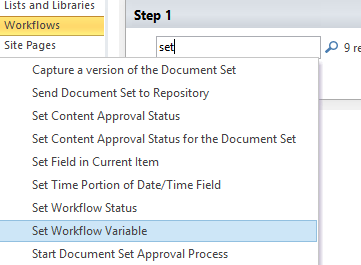
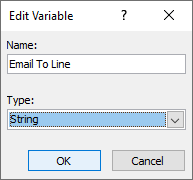
1. Set a new workflow variable of type string to the email address(es) that aren’t receiving emails as expected.

2. Now in your email settings, use the “Workflow Lookup for a User” option and select your new variable from “Workflow Variables and Parameters” data source.


3. Publish the changes to your workflow and test.

Leave a Reply