
Microsoft Teams has three types of virtual meetings:
- Meetings
- Webinars
- Live Events
Live events already had a nice attendance report (which I assume will be available for webinars as well), but traditional/regular meetings had yet to see a similar feature until now. You could always export attendance during the meeting, but it was a snapshot at that moment and you didn’t capture those who had left early or joined late depending on when you exported it. It also didn’t capture join/leave times.
Now meetings have attendance reports that you can get AFTER the meeting as well. Note that you must be the organizer or co-organizer, and your admin must have enabled this ability. See here for more info.
You can get these attendance reports in a downloadable CSV/Excel format in the meeting chat once the meeting ends (a post with a downloadable report will appear) or from meeting details by simply following these steps after the meeting ends:
- Open the meeting/event in Teams to view Meeting Details
- Click the Attendance report icon to download the Excel file to your machine’s Downloads folder

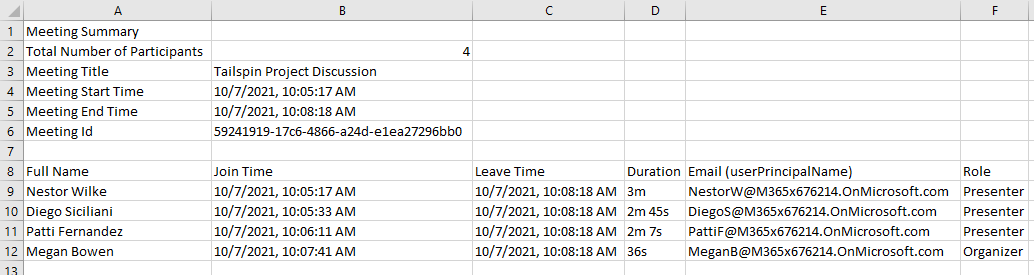
The resulting report will feature these details:
- Total participants
- Meeting start/end
- Attendee name
- Attendee join/leave times
- Duration attended
- Role
You do have a third option if it’s a meeting that you’re the sole organizer of (meaning it’s not a channel/team meeting). For one of your meetings, you can also find attendance by opening the meeting/event details and choosing the Attendance tab at the top. This tab is not available for channel meetings, but does give you a nice view of attendance stats without having to download anything. Check out the video below to see all three methods in action:


Leave a Reply